Posts

SCCM 2012 R2 Cumulative Update 1 Step by Step
Image
Cumulative Update 1 for System Center 2012 R2 Configuration Manager     The CU1 includes two diferrent hotfixes one is the KB 2938441 and the other one is for some PowerShell changes KB 2932274 Download and more info: Cumulative Update 1 for System Center 2012 R2 Configuration Manager http://support.microsoft.com/kb/2938441   Windows PowerShell changes in Cumulative Update 1 for System Center 2012 R2 Configuration Manager http://support.microsoft.com/kb/2932274 Step by Step ­ Start the "CM12-R2CU1-KB2938441-X64-ENU.exe" On the Microsoft License Terms page, Accept and then click Next On the Prerequisites page, click Next On the Console Update Option page, Select Install the update for the configuration manager console then click Next On the Database Update page, Select   Yes, update the site database and click Next On the Deployment Assistance Options page, Select ...

SCOM 2012 R2 Update Rollup 2 Released

Image
Update Rollup 2 for System Center 2012 R2 Operations Manager The UR2 has been released and it will be fixing the Dashboards and Widgets issues. Issues that are fixed in this update rollup Operations Manager Issue 1 This update rollup makes the stored procedure performance aggregate more robust against out-of-range values. Issue 2 Adding multiple regular expressions (RegEx) to a group definition causes an SQL exception when the group is added or run. Issue 3 Web applications fail when they are monitored by the System Center Operations Manager 2012 R2 APM agent. Issue 4 Service Level Objectives (SLO) dashboards sometimes load in several seconds and sometimes take minutes to load. Additionally, the dashboard is empty after it loads in some cases. Issue 5 Operations Manager Console crashes when you try to override the scope in the Authoring pane. Issue 6 The System Center Operations Manager console is slow to load views if you are a member of a custom Operator role. Issue ...

System Center Service Manager 2012 R2 Notification Channels (SCSM 2012 R2)

Image
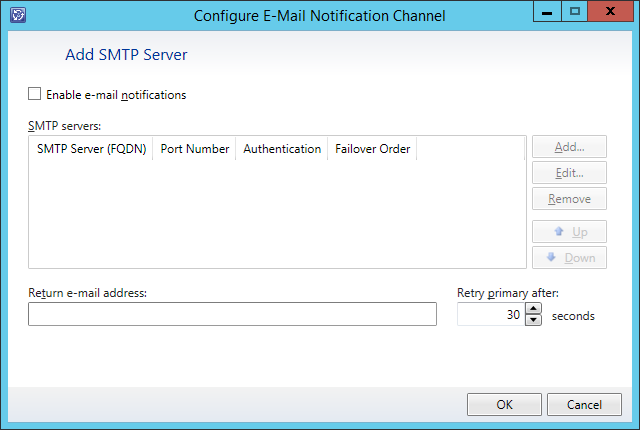
Here's a simple step by step guide of how to configure SCSM Notification Channel In the Service Manager console, click Administration . In the Administration pane, expand Administration , and click Notifications then click Channels . In the Tasks pane, under Channels , select E-mail Notification Channels then click Properties . Complete the following steps on the E-Mail Notification Channel Wizard: Click on Enable e-mail notifications and then click on Add to configure the SMTP server.      Set the SMTP Server (FQDN), Port and the Authentication method then click OK to close. Configure the Return e-mail address and then click Ok to close.

Introducing Microsoft System Center 2012 R2 Download Free Ebook

Image
Introducing Microsoft System Center 2012 R2 Free eBook:     Microsoft System Center is one of the three pillars of Microsoft’s Cloud OS vision that will transform the traditional datacenter environment, help businesses unlock insights in data stored anywhere, enable the development of a wide range of modern business applications, and empower IT to support users who work anywhere while being able to manage any device in a secure and consistent way. The other two pillars of the Cloud OS are, of course, Windows Server 2012 R2 and Windows Azure, and Microsoft Press has recently released free Introducing books on these platforms as well. Whether you are new to System Center or are already using it in your business, this book has something that should interest you. The capabilities of each component of System Center 2012 R2 are first described and then demonstrated chapter by chapter. Real-world and under-the-hood insights are also provided by insiders at Microsoft who live...

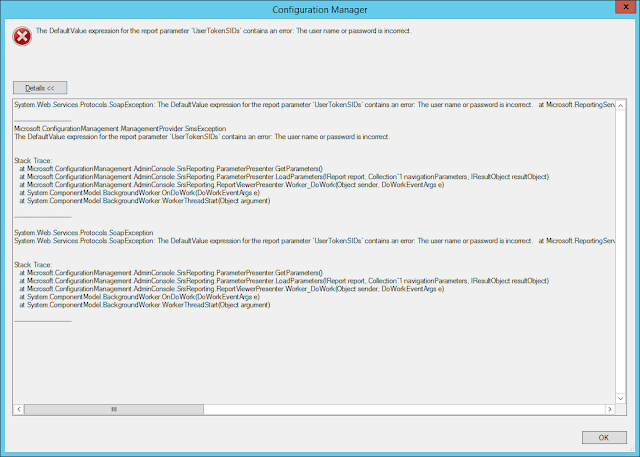
How to fix SCCM 2012 R2 Reporting Services Issue (When users try to run reports it shows like the DefaultValue expression for the report parameter 'UserTokeSIDs' contains an error) Updated

Image
CLICK ON THE BELOW LINK FOR THE UPDATED POST How to fix SCCM 2012 R2 Reporting Services Issue Issue: When users try to run reports it shows like the DefaultValue expression for the report  parameter  'UserTokeSIDs' contains an error.  Now you will be able to run your SCCM Reports !

Upgrade to Virtual Machine Manager 2012 R2 RTM from 2012 SP1

Image
Upgrade to Virtual Machine Manager 2012 R2 RTM  from 2012 SP1 Virtual Machine Manager doesn't support in-place upgrade, another bad new is the P2V utility is not supported on   VMM 2012 R2.  Now going over the process, it will be straight forward, as always I recommed you to have a back out plan.   Tasks: Uninstall SCVMM Management Server and Console  Retain Database on SQL Uninstall ADK 8.0 (It will require a Restart) Install ADK 8.1 with the same features.  [Note: After Install ADK8.1 you will be able to install  SCVMM 2012 R2 RTM] Step by Step  Uninstall VMM MS and Console  Retain Database  Uninstalled  Install VMM 2012 R2 RTM  Select the existing Database VirtualManagerDB Now it will be upgrading the Database  Done  Enjoy !...

How to Install Roles and Features Offline to a VHD/VHDX in Windows Server 2012 R2

Image
How to Install Roles and Features Offline to a VHD/VHDX in Windows Server 2012 R2 As you know there's a lot  of great things on this  new release, this new feature is so interesting to me because if you have Virtual Machine Templates on Hyper-V now you can modify them and made your installations really fast. In my scenario I have 3 VHD Templates Bronze Template (48GB for Print Servers/ Web Servers) Silver Template  (64GB for ) Gold Template  (72GB for DC's/ File Servers/ System Center Servers/ SQL Servers ) Step by Step to Edit/Modify a VHD/VHDX Offline  Go to Server Manager and Click on Mange and Add Roles and Features Select your VHD/VHDX After Selecting your Roles and  Features click Install Now you're done editing your VM Template/V HD  Follow me on twitter    @DavidiAcevedo