Posts

Showing posts with the label System Center

Update Rollup 1 for Microsoft System Center 2016

More info here; https://support.microsoft.com/en-us/kb/3190609 Fixes on this UR1; Data Protection Manager See the following Knowledge Base article for details about these fixes and installation instructions: 3190600 Update Rollup 1 for System Center 2016 Data Protection Manager Operations Manager See the following Knowledge Base article for details about these fixes and installation instructions: 3190029 Update Rollup 1 for System Center 2016 Operations Manager Orchestrator See the following Knowledge Base article for details about these fixes and installation instructions: 3190603 Update Rollup 1 for Microsoft System Center 2016 Orchestrator Service Management Automation See the following Knowledge Base article for details about these fixes and installation instructions: 3190604 Update Rollup 1 for System Center 2016 Service Management Automation Service Provider Foundation See the following Knowledge Base article for details about these fixes and in...
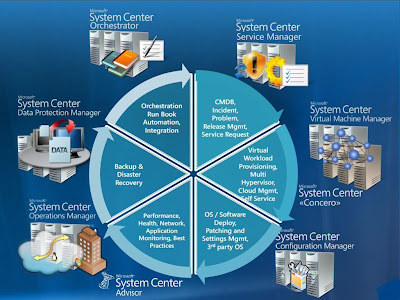
What's System Center 2012 ?

Image
System Center 2012 Microsoft  Enterprise Solution Overview Microsoft System Center 2012 is an integrated management platform that helps you to easily and efficiently manage your datacenters, client devices, and hybrid cloud IT environments. System Center 2012 is the only platform to offer comprehensive management of applications, services, physical resources, multiple hypervisors , software defined networks, configuration, and automation in a single offering. Products in System Center  System Center App Controller Deploy and Manage your Private and Public Cloud.    System Center Service Manager  Manage your Desktop Department, Incidents, Service Request and more.  System Center Virtual Machine Manager  Manage your Hypervisors (VMware, Hyper-V, Citrix), deploy Private Clouds.  System Center Configuration Manager  Manage all your Systems (Patch, Apps, OS, Power MGMT and more)  System Center Operations ...

How to Update Management Packs in SCOM 2007 R2 / 2012 / R2

Image
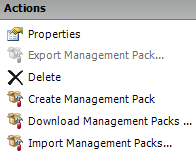
Update Management Packs in  SCOM  2007 R2 / 2012   Hello everyone there here a Step by step of the process that it needs to be follow to update management packs, as always I recommend test on your DEV environment first.  Project Plan: Project: SCOM Management Packs Update Download the New Management Packs Import Management Packs and Update on DEV environment  Test the Management Packs on DEV Environment Import Sealed Management Packs and update on Production Environment  End 1.        From the Administration Tab  > Go to Management Packs > Download management packs a.        From the MP Catalog download and copy the new management packs to your Dev environment. 2.        Select Updates available for installed management packs and click on Search . a.    ...