Posts

Showing posts with the label APP-V

Desktop Infrastructure Workshop App-V 5.0, VDI. Hyper-V, Server 2012,Windows 8

Desktop Infrastructure Workshop App-V 5.0, VDI. Hyper-V, Server 2012,Windows 8 Microsoft PR Today conducted a seminar Desktop Deployment Services focused on Microsoft technologies.  One of the technologies my attention was App-V to help the issue of migration   from Windows XP to Windows 8.  These workshops are going to be providing weekly, whether public from 5 people on and they will be selected from our database.
How to convert a Package of App-V 4.6 to App-V 5.0 with Power Shell

Image
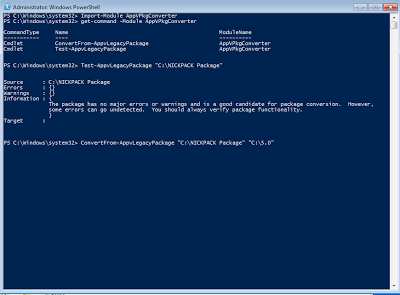
How to convert a legacy package to App-V 5.0 with Power Shell Hello everyone there here’s an script for convert the legacy App-V packages on a Sequencer VM You will need to use Power Shell x32 to make this happen .  Windows 7 x32  SP1 with Power Shell 3.0 and .NetFramework 4. On this machine you will need the sequencer application installed to get all Cmdlets of App-V. I recommend use Power Shell ISE and save the script for future conversions.   Import-Module AppvPkgconverter <enter> # Imports App-V Module Get-Command -Module AppvPkgConverter <enter> # To Get Commands of Appv Test-LegacyAppvPackage "C:\Packages\APP" <enter> # Test if the package will work with App-V 5.0 Convertfrom-LegacyAppvPackage "C:\Packages\APP"  "C:\5.0\APP" <enter> # If the test was great convert the old Virtual App to a App-V 5.0. Don't Forget create the Target Directory   Thanks for watching...

Administering App-V 4.5 (Application Virtualization )

Image
Administering App-V  Here   I leave the how you can virtualize one   application   and these   operate   from a single point, for   so   IT staff this less loaded.  In a real environment to do manual installations on PC's and often the volume is very high.  In these manuals facilities you   could   take if 50 machines are more or less 20  days   8 hours each of these.  Another of the common forms is using   images    via   Windows Deployment Services, and with the applications installed and   so   will reduce long enough, now these applications if they fail more work the machine   physically   or by remote desktop and it usually takes a long time   to   uninstalling and   installing   the same again. Solution: APP-V can help in about ...

App-V 4.6 Skydrive Error when trying to open office on App-V 4.6 SOLUTION

Image
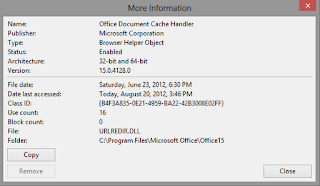
Hello Everyone I worked this issue with the Microsoft engineers and they told me this trouble it wasn't supported on this version of APP-V 4.6SP1. Now, you can solve this problem installing this Add-On via GPO's modifying some registry keys.    Here the steps to make this happen.  This Particular Add-On doesn't work when you virtualize Office,  which is means you have to make this changes manually.  Solution:  Open Skydrive.com and try to open an document of each one App like Word, Excel and Power Point before the sequencing finish.  Make sure that the Office Document Cache handler its enabled on IE. Work’s !!!!!