How to convert a Package of App-V 4.6 to App-V 5.0 with Power Shell
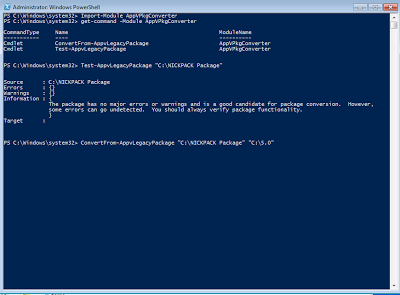
How to convert a legacy package to App-V 5.0 with Power Shell Hello everyone there here’s an script for convert the legacy App-V packages on a Sequencer VM You will need to use Power Shell x32 to make this happen . Windows 7 x32 SP1 with Power Shell 3.0 and .NetFramework 4. On this machine you will need the sequencer application installed to get all Cmdlets of App-V. I recommend use Power Shell ISE and save the script for future conversions. Import-Module AppvPkgconverter <enter> # Imports App-V Module Get-Command -Module AppvPkgConverter <enter> # To Get Commands of Appv Test-LegacyAppvPackage "C:\Packages\APP" <enter> # Test if the package will work with App-V 5.0 Convertfrom-LegacyAppvPackage "C:\Packages\APP" "C:\5.0\APP" <enter> # If the test was great convert the old Virtual App to a App-V 5.0. Don't Forget create the Target Directory Thanks for watching...
